Kea DHCP Workshop @ Heise, März 2023
1 Kea DHCP Einführung
1.1 Typographic conventions in this notes
[host]$indicates a shell of an un-privileged user[host]%indicates a shell of the root user (the normal bourne shell prompt forrootis#, but that can be confused with comments in configuration files)[host]%commands for the container host[kea-server]%commands for the Kea DHCP Server machine[relay]%commands for the DHCP relay machine[bind]%commands for the DNS Server machine[clientA]%commands for the 1st DHCP client machine[clientB]%commands for the 2nd DHCP client machine
1.2 tmux - terminal multiplexer
- we will work with multiple machines (kea-server, clientA, clientB,
relay, bind9) in the lab exercises. You can open one terminal
session (SSH Session) per machine, but you can also use the
Terminal Multiplexer
tmuxwithin one terminal session - start
tmuxby executing the commandtmux - attach to a already running tmux session:
[host]% tmux attach - Help : CTRL+B - ?
- start a new tmux window : CTRL+B - c
- cancel the current window : CTRL+B - x
- next window : CTRL+B - n
- previous window : CTRL+B - p
- jump to a window : CTRL+B - <n> (0-9)
- Split-Screen (horizontal) : CTRL+B - "
- Split-Screen (vertical) : CTRL+B - %
- switch pane in split screen : CTRL+B - o
- switch pane in split screen : CTRL+B - Cursor-Arrow-Key
- tmux detach session : CTRL+B - d
1.3 VIM JSON Syntax Highlighting
- in
vim, you can turn on syntax highlighting for JSON in the command mode with: set syntax=json
1.4 EMACS JSON Mode
- https://www.emacswiki.org/emacs/JSON
- enable JSON-Mode in Emacs with
ESC-X json-mode<enter> - re-format a JSON file with
CTRL+c-CTRL+f
1.5 LAB01 - ISC-Kea-DHCP Basic configuration
1.5.1 Lab network
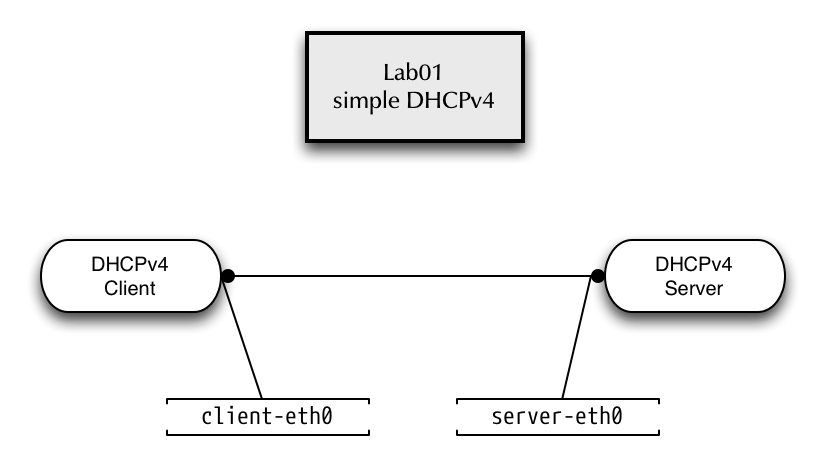
1.5.2 Prepare the Lab environment for Lab01
- Start a root-shell
[host]$ sudo -i
- Change to
/root/lab/lab01[host]% cd /root/lab/lab01
- start the
./runshell script to start the containersclientandkea-server. Some error messages are expected when running this script (the script first tries to clean up running container that are not started at this point) - check the running container with the command
running[host]% running kea-server client
1.5.3 a simple DHCPv4 Server configuration
- Enter the KEA-Server container
[host]% enter kea-server
- Create the Kea DHCP Server configuration file
/etc/kea/kea-dhcp4.conf
{
"Dhcp4": {
    "interfaces-config": {
        "interfaces": [ "server-eth0" ],
        "dhcp-socket-type": "raw"
    },
    "control-socket": {
        "socket-type": "unix",
        "socket-name": "/tmp/kea-dhcp4.socket"
    },
    "lease-database": {
        "type": "memfile",
        "lfc-interval": 3600
    },
    "renew-timer": 900,
    "rebind-timer": 1800,
    "valid-lifetime": 3600,
    "subnet4": [
        {
            "subnet": "192.0.2.0/24",
            "pools": [ { "pool": "192.0.2.100 - 192.0.2.200" } ],
            "option-data": [
                {
                    "name": "routers",
                    "data": "192.0.2.1"
                }
            ]
        }
    ]},
    "loggers": [
    {
        "name": "kea-dhcp4",
        "output_options": [
            {
                "output": "/var/log/kea-dhcp4.log"
            }
        ],
        "severity": "INFO",
        "debuglevel": 0
    }
  ]
}
}
- Check the syntax of the Kea DHCP4 configuration file. This time, the Kea-DHCP4 syntax check should return with an error
% kea-dhcp4 -t /etc/kea/kea-dhcp4.conf
Syntax check failed with: /etc/kea/kea-dhcp4.conf:29.7: syntax error, unexpected ",", expecting }
- Try to fix the error and check again
- Successful Syntax check
% kea-dhcp4 -t /etc/kea/kea-dhcp4.conf
INFO  [kea-dhcp4.dhcpsrv/51] DHCPSRV_CFGMGR_ADD_IFACE listening on interface server-eth0
INFO  [kea-dhcp4.dhcpsrv/51] DHCPSRV_CFGMGR_SOCKET_TYPE_DEFAULT "dhcp-socket-type" not specified , using default socket type raw
INFO  [kea-dhcp4.dhcpsrv/51] DHCPSRV_CFGMGR_NEW_SUBNET4 a new subnet has been added to configuration: 192.0.2.0/24 with params: t1=900, t2=1800, valid-lifetime=3600
- Start the KEA DHCPv4 server module via systemd
% systemctl start kea-dhcp4
- Check the status of the service
% systemctl status kea-dhcp4
● kea-dhcp4.service - Kea DHCPv4 Server
   Loaded: loaded (/usr/lib/systemd/system/kea-dhcp4.service; disabled; vendor preset: disabled)
   Active: active (running) since Thu 2018-12-06 10:13:26 UTC; 4s ago
     Docs: man:kea-dhcp4(8)
 Main PID: 63 (kea-dhcp4)
    Tasks: 1 (limit: 1144)
   Memory: 1.9M
   CGroup: /machine.slice/libpod-2e3e4a67333cf94630baa9c268ae84f8e77353abf14b074ed2ef9d73bc6e4f53.scope/system.slice/kea-dhcp4.service
           └─63 /usr/sbin/kea-dhcp4 -c /etc/kea/kea-dhcp4.conf

Dec 06 10:13:26 2e3e4a67333c systemd[1]: Started Kea DHCPv4 Server.
Dec 06 10:13:26 2e3e4a67333c kea-dhcp4[63]: 2018-12-06 10:13:26.674 INFO  [kea-dhcp4.dhcp4/63] DHCP4_STARTING Kea DHCPv4 server version 1.3.0 starting
Dec 06 10:13:26 2e3e4a67333c kea-dhcp4[63]: 2018-12-06 10:13:26.676 INFO  [kea-dhcp4.dhcpsrv/63] DHCPSRV_CFGMGR_ADD_IFACE listening on interface server-eth0
Dec 06 10:13:26 2e3e4a67333c kea-dhcp4[63]: 2018-12-06 10:13:26.676 INFO  [kea-dhcp4.dhcpsrv/63] DHCPSRV_CFGMGR_SOCKET_TYPE_DEFAULT "dhcp-socket-type" not specified , using default socke>
Dec 06 10:13:26 2e3e4a67333c kea-dhcp4[63]: 2018-12-06 10:13:26.677 INFO  [kea-dhcp4.dhcpsrv/63] DHCPSRV_CFGMGR_NEW_SUBNET4 a new subnet has been added to configuration: 192.0.2.0/24 wit>
Dec 06 10:13:26 2e3e4a67333c kea-dhcp4[63]: 2018-12-06 10:13:26.677 INFO  [kea-dhcp4.dhcp4/63] DHCP4_CONFIG_COMPLETE DHCPv4 server has completed configuration: added IPv4 subnets: 1; DDN>
Dec 06 10:13:26 2e3e4a67333c kea-dhcp4[63]: 2018-12-06 10:13:26.677 INFO  [kea-dhcp4.dhcpsrv/63] DHCPSRV_MEMFILE_DB opening memory file lease database: lfc-interval=3600 type=memfile uni>
Dec 06 10:13:26 2e3e4a67333c kea-dhcp4[63]: 2018-12-06 10:13:26.679 INFO  [kea-dhcp4.dhcpsrv/63] DHCPSRV_MEMFILE_LEASE_FILE_LOAD loading leases from file /var/lib/kea/kea-leases4.csv
Dec 06 10:13:26 2e3e4a67333c kea-dhcp4[63]: 2018-12-06 10:13:26.680 INFO  [kea-dhcp4.dhcpsrv/63] DHCPSRV_MEMFILE_LFC_SETUP setting up the Lease File Cleanup interval to 3600 sec
1.5.4 DHCP Client
- On a different Terminal (TMUX pane or window)
- Enter the client container
% enter client
- Interface
client-eth0should have no IP configuration
# ip addr show
1: lo: <LOOPBACK,UP,LOWER_UP> mtu 65536 qdisc noqueue state UNKNOWN group default qlen 1000
    link/loopback 00:00:00:00:00:00 brd 00:00:00:00:00:00
    inet 127.0.0.1/8 scope host lo
       valid_lft forever preferred_lft forever
    inet6 ::1/128 scope host
       valid_lft forever preferred_lft forever
10: client-eth0@if9: <BROADCAST,MULTICAST,UP,LOWER_UP> mtu 1500 qdisc noqueue state UP group default qlen 1000
    link/ether fa:34:f8:0e:a4:ff brd ff:ff:ff:ff:ff:ff link-netnsid 1
    inet6 fe80::f834:f8ff:fe0e:a4ff/64 scope link
       valid_lft forever preferred_lft forever
- Manually start the ISC DHCP client
[client]% dhclient -v client-eth0
Internet Systems Consortium DHCP Client 4.4.2b1
Copyright 2004-2019 Internet Systems Consortium.
All rights reserved.
For info, please visit https://www.isc.org/software/dhcp/

Listening on LPF/client-eth0/72:28:b2:66:0d:f5
Sending on   LPF/client-eth0/72:28:b2:66:0d:f5
Sending on   Socket/fallback
DHCPDISCOVER on client-eth0 to 255.255.255.255 port 67 interval 3 (xid=0xb1f0b267)
DHCPOFFER of 192.0.2.100 from 192.0.2.1
DHCPREQUEST for 192.0.2.100 on client-eth0 to 255.255.255.255 port 67 (xid=0xb1f0b267)
DHCPACK of 192.0.2.100 from 192.0.2.1 (xid=0xb1f0b267)
bound to 192.0.2.100 -- renewal in 847 seconds.
- KEA-DHCP DHCPv4 Lease-file on the server side
[kea-server]% cat /var/lib/kea/kea-leases4.csv
address,hwaddr,client_id,valid_lifetime,expire,subnet_id,fqdn_fwd,fqdn_rev,hostname,state
192.0.2.100,9e:81:8f:31:62:85,ff:8f:31:62:85:00:04:22:6c:05:90:05:96:45:33:8d:ab:47:f1:1b:bf:66:0a,3600,1544097000,1,0,0,,0
1.6 Kea-DHCP-Server REST API and dynamic reconfiguration
1.6.1 Configuring the Kea Control Agent
- A KEA-DHCP server takes control commands over a
unixsocket. The socket location is defined in the KEA-Server configuration file. Make sure the socket definition for the DHCPv4 server looks like this
{
    "Dhcp4": {
        "control-socket": {
            "socket-type": "unix",
            "socket-name": "/var/lib/kea/kea-dhcp4.socket"
        },
        "valid-lifetime": 3600,
[...]
- Test the configuration and restart the service
[kea-server]% kea-dhcp4 -t /etc/kea/kea-dhcp4.conf
[kea-server]% systemctl restart kea-dhcp4
- On the Kea-Server machine, create a configuration for the KEA
Control Agent in the file
/etc/kea/kea-ctrl-agent.conf, listening on an HTTP-REST API Endpoint port 9099 on IPv6localhost:
{
    "Control-agent": {
        "http-host": "::1",
        "http-port": 9099,
        "control-sockets": {
            "dhcp4": {
                "socket-type": "unix",
                "socket-name": "/var/lib/kea/kea-dhcp4.socket"
            }
        },
        "loggers": [
            {
                "name": "kea-ctrl-agent",
                "severity": "INFO",
                "output_options": [
                    {
                    "output": "/var/log/kea-ctrl-agent.log"
                    }
                ]
            }
        ]
    }
}
- Check the configuration file for syntax errors
[kea-server]% kea-ctrl-agent -t /etc/kea/kea-ctrl-agent.conf
- test the control agent configuration and start the agent:
[kea-server]% systemctl start kea-ctrl-agent
[kea-server]% systemctl status kea-ctrl-agent
● kea-ctrl-agent.service - Kea Control Agent
   Loaded: loaded (/etc/systemd/system/kea-ctrl-agent.service; disabled; vendor preset: disabled)
   Active: active (running) since Sun 2018-12-09 21:33:12 UTC; 1s ago
     Docs: man:kea-ctrl-agent(8)
 Main PID: 361 (kea-ctrl-agent)
    Tasks: 1 (limit: 1144)
   Memory: 1.8M
   CGroup: /machine.slice/libpod-5c5b9d031716ba7b04e2726f7c6f7ef48cdd95d4bbac8c51e7fb591fb7c900c1.scope/system.slice/kea-ctrl-agent.service
           └─361 /usr/sbin/kea-ctrl-agent -c /etc/kea/kea-ctrl-agent.conf

Dec 09 21:33:12 5c5b9d031716 systemd[1]: Started Kea Control Agent.
Dec 09 21:33:12 5c5b9d031716 kea-ctrl-agent[361]: 2018-12-09 21:33:12.528 INFO  [kea-ctrl-agent.dctl/361] DCTL_STARTING Control-agent starting, pid: 361, version: 1.3.0
Dec 09 21:33:12 5c5b9d031716 kea-ctrl-agent[361]: 2018-12-09 21:33:12.531 INFO  [kea-ctrl-agent.ctrl-agent/361] CTRL_AGENT_HTTP_SERVICE_STARTED HTTP service bound to address ::1:90>
Dec 09 21:33:12 5c5b9d031716 kea-ctrl-agent[361]: 2018-12-09 21:33:12.531 INFO  [kea-ctrl-agent.dctl/361] DCTL_CONFIG_COMPLETE server has completed configuration: listening on ::1,>
- Sending API calls via
curl. Here we send theconfig-getcommand to the DHCPv4 server
[kea-server]% curl -X POST -H "Content-Type: application/json" \
  -d '{ "command": "config-get", "service": [ "dhcp4" ] }' \
  http://[::1]:9099/
- The output is unformatted JSON. The tool
jqcan be used to pretty-print the output
[kea-server]% curl --no-progress-meter -X POST -H "Content-Type: application/json" \
   -d '{ "command": "config-get", "service": [ "dhcp4" ] }' \
   http://[::1]:9099/ | jq .
jqcan be used to filter specific parts of the configuration. Thejqfilter".[0].arguments"can be used to produce a valid KEA configuration file:
[kea-server]% curl --no-progress-meter -s -X POST -H "Content-Type: application/json" \
  -d '{ "command": "config-get", "service": [ "dhcp4" ] }' \
  http://[::1]:9099/ | jq ".[0].arguments.Dhcp4.loggers"
[
  {
    "debuglevel": 0,
    "name": "kea-dhcp4",
    "output_options": [
      {
        "output": "/var/log/kea-dhcp4.log"
      }
    ],
    "severity": "INFO"
  }
]
- The
list-commandscommand returns back the API commands available for a specific KEA module
[kea-server]% curl --no-progress-meter -X POST -H "Content-Type: application/json" \
  -d '{ "command": "list-commands", "service": [ "dhcp4" ] }' \
  http://[::1]:9099/ | jq
1.6.2 Dynamic changes to the KEA configuration file
- Dump the current configuration into the file
kea-dhcp4.tmp
[kea-server]% curl --no-progress-meter -s -X POST -H "Content-Type: application/json" \
     -d '{ "command": "config-get",  "service": [ "dhcp4" ] }' \
     http://[::1]:9099/ | jq ".[0]" > kea-dhcp4.tmp
- Edit the file, add the
commandandserviceinformation, remove theresultstructure at the end of the file and make changes to the configuration (in this example we set the DHCP server to be authoritative):
{
  "command": "config-set",
  "service": [ "dhcp4" ],
  "arguments": {
    "Dhcp4": {
      "authoritative": true,
      "boot-file-name": "",
      "calculate-tee-times": false,
[...]
- Send the new configuration to the server
[kea-server]% curl --no-progress-meter -s -X POST \
   -H "Content-Type: application/json" \
   -d @kea-dhcp4.tmp http://[::1]:9099/ | jq .
- Successful result
[
  {
    "result": 0,
    "text": "Configuration successful."
  }
]
- All dynamic changes are stored in memory. In order to make the changes persistent, write the in-memory configuration back to a file (be careful, any comments in the file will be gone and the formatting will be different)
[kea-server]% curl --no-progress-meter -s -X POST -H "Content-Type: application/json" \
                   -d '{ "command": "config-write", "arguments": { "filename": "/etc/kea/kea-dhcp4-new.json" }, "service": [ "dhcp4" ] }' \
                   http://[::1]:9099/ | jq .
- Successful result
[
  {
    "arguments": {
      "filename": "/etc/kea/kea-dhcp4-new.json",
      "size": 3248
    },
    "result": 0,
    "text": "Configuration written to /etc/kea/kea-dhcp4-new.json successful"
  }
]
1.6.3 Remove the lab01 setup
- Exit both the Kea-Server container and the client container
- Execute both the
./stopand the./cleanscripts on the host (inside directory/root/lab/lab01)
1.7 LAB02 - ISC-DHCP Relay-Agent
1.7.1 Lab network
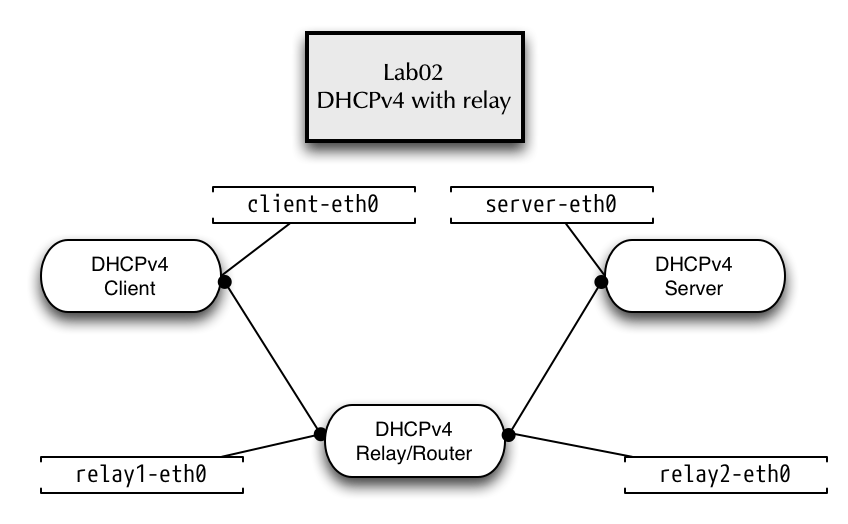
1.7.2 DHCPv4 with relay agent
- We work in directory
lab02and start the lab container
[host]% cd /root/lab/lab02
[host]% ./run
- We will start the DHCPv4 relay agent on the container named "relay"
[host]% enter relay
- The relay agent will listen on interface
relay1-eth0for DHCP broadcast messages and will forward these messages to the Kea-DHCP-Server on address 100.64.0.1
[relay]%  dhcrelay -id relay1-eth0 -iu relay2-eth0 -d 100.64.0.1
Requesting: relay1-eth0 as upstream: N downstream: Y
Requesting: relay2-eth0 as upstream: Y downstream: N
Dropped all unnecessary capabilities.
Internet Systems Consortium DHCP Relay Agent 4.4.2b1
Copyright 2004-2019 Internet Systems Consortium.
All rights reserved.
For info, please visit https://www.isc.org/software/dhcp/
Listening on LPF/relay2-eth0/d2:90:88:da:b9:48
Sending on   LPF/relay2-eth0/d2:90:88:da:b9:48
Listening on LPF/relay1-eth0/f6:94:7a:a5:69:9d
Sending on   LPF/relay1-eth0/f6:94:7a:a5:69:9d
Sending on   Socket/fallback
Dropped all capabilities.
- On a different terminal (tmux pane or window), we enter the Kea DHCP server container
[host]% enter kea-server
- As the DHCP requests from clients will now be received by the
Kea-Server via UDP unicast, we can configure Kea to listen on UDP
socket only:
"dhcp-socket-type": "udp" - Edit the file
/etc/kea/kea-dhcp4.conf:
{
"Dhcp4": {
    "interfaces-config": {
        "interfaces": [ "server-eth0" ],
        "dhcp-socket-type": "udp"
    },
[...]
- Test the Kea DHCP4 configuration file
[kea-server]% kea-dhcp4 -t /etc/kea/kea-dhcp4.conf
- Start the Kea-Server and make sure it is running
[kea-server]% systemctl start kea-dhcp4
[kea-server]% systemctl status kea-dhcp4
● kea-dhcp4.service - Kea DHCPv4 Server
   Loaded: loaded (/usr/lib/systemd/system/kea-dhcp4.service; disabled; vendor preset: disabled)
   Active: active (running) since Thu 2018-12-06 20:26:05 UTC; 3s ago
     Docs: man:kea-dhcp4(8)
 Main PID: 47 (kea-dhcp4)
    Tasks: 1 (limit: 1144)
   Memory: 9.2M
   CGroup: /machine.slice/libpod-131e8c63aa04d242f4f9c4037b0106eb88a56b03b2bf6e639e306df2e06dd09c.scope/system.slice/kea-dhcp4.service
           └─47 /usr/sbin/kea-dhcp4 -c /etc/kea/kea-dhcp4.conf

Dec 06 20:26:05 131e8c63aa04 systemd[1]: Started Kea DHCPv4 Server.
Dec 06 20:26:05 131e8c63aa04 kea-dhcp4[47]: 2018-12-06 20:26:05.450 INFO  [kea-dhcp4.dhcp4/47] DHCP4_STARTING Kea DHCPv4 server version 1.3.0 starting
Dec 06 20:26:05 131e8c63aa04 kea-dhcp4[47]: 2018-12-06 20:26:05.457 INFO  [kea-dhcp4.dhcpsrv/47] DHCPSRV_CFGMGR_SOCKET_TYPE_SELECT using socket type udp
Dec 06 20:26:05 131e8c63aa04 kea-dhcp4[47]: 2018-12-06 20:26:05.458 INFO  [kea-dhcp4.dhcpsrv/47] DHCPSRV_CFGMGR_ADD_IFACE listening on interface server-eth0
Dec 06 20:26:05 131e8c63aa04 kea-dhcp4[47]: 2018-12-06 20:26:05.465 INFO  [kea-dhcp4.dhcpsrv/47] DHCPSRV_CFGMGR_NEW_SUBNET4 a new subnet has been added to configuration: 192.0.2.0/24 wit>
Dec 06 20:26:05 131e8c63aa04 kea-dhcp4[47]: 2018-12-06 20:26:05.466 INFO  [kea-dhcp4.dhcp4/47] DHCP4_CONFIG_COMPLETE DHCPv4 server has completed configuration: added IPv4 subnets: 1; DDN>
Dec 06 20:26:05 131e8c63aa04 kea-dhcp4[47]: 2018-12-06 20:26:05.467 INFO  [kea-dhcp4.dhcpsrv/47] DHCPSRV_MEMFILE_DB opening memory file lease database: lfc-interval=3600 type=memfile uni>
Dec 06 20:26:05 131e8c63aa04 kea-dhcp4[47]: 2018-12-06 20:26:05.469 INFO  [kea-dhcp4.dhcpsrv/47] DHCPSRV_MEMFILE_LEASE_FILE_LOAD loading leases from file /var/lib/kea/kea-leases4.csv
Dec 06 20:26:05 131e8c63aa04 kea-dhcp4[47]: 2018-12-06 20:26:05.470 INFO  [kea-dhcp4.dhcpsrv/47] DHCPSRV_MEMFILE_LFC_SETUP setting up the Lease File Cleanup interval to 3600 sec
- Next, on a third terminal (tmux pane or window), enter the
clientcontainer
[host]% enter client
- Start the
dhclientprogram to request a DHCP lease
[client]% dhclient -v client-eth0
Internet Systems Consortium DHCP Client 4.3.6
Copyright 2004-2017 Internet Systems Consortium.
All rights reserved.
For info, please visit https://www.isc.org/software/dhcp/

Listening on LPF/client-eth0/b2:b9:2e:f6:5e:65
Sending on   LPF/client-eth0/b2:b9:2e:f6:5e:65
Sending on   Socket/fallback
DHCPDISCOVER on client-eth0 to 255.255.255.255 port 67 interval 6 (xid=0xe8e47a25)
DHCPREQUEST on client-eth0 to 255.255.255.255 port 67 (xid=0xe8e47a25)
DHCPOFFER from 192.0.2.1
DHCPACK from 192.0.2.1 (xid=0xe8e47a25)
bound to 192.0.2.109 -- renewal in 847 seconds.
- Log output on the relay
Forwarded BOOTREQUEST for b2:b9:2e:f6:5e:65 to 100.64.0.1
Forwarded BOOTREPLY for b2:b9:2e:f6:5e:65 to 192.0.2.109
Forwarded BOOTREQUEST for b2:b9:2e:f6:5e:65 to 100.64.0.1
Forwarded BOOTREPLY for b2:b9:2e:f6:5e:65 to 192.0.2.109
1.7.3 Using the DHCP-Client Script as a debugging tool
- The ISC DHCP Client executes a shell script to configure the
operating system with the DHCP lease information. While the
dhclientbinary is the same of different operating systems (Linux, BSD, commercial Unix), the shell script takes over the system dependent part - the lease parameters are given to the script in form of environment
variables that can be printed out with the
envshell command - in the client container, create a new shell script with the name
dhclient-debug.shand the following content#!/bin/sh env
- Make the script executable
[client]% chmod +x dhclient-debug.sh
- Stop a previous running
dhclientprocess[client]% dhclient -r
- Start the
dhclientprogram using the script and inspect the output.[client]% dhclient -v -sf dhclient-debug.sh client-eth0
1.7.4 Inspecting DHCP traffic with tcpdump
- On the Kea-Server container, observe the DHCP communication between
the relay-agent and the DHCP-Server using
tcpdump.[kea-server]% tcpdump -vv -i server-eth0 port 67 or port 68
- Start a new client lease request from the client (
dhclient -rreleases the current lease).[client]% dhclient -r [client]% dhclient -v -sf dhclient-debug.sh client-eth0
1.7.5 Lab 02 Cleanup
- Exit the
client,relayandkea-servermachines - Execute the scripts
./stopand./cleanin/root/kea/lab02/on the host
1.8 Lab Umgebung
2 Kea Lease Zuteilung
2.1 LAB03 - Multiple subnet definitions
2.1.1 Lab network
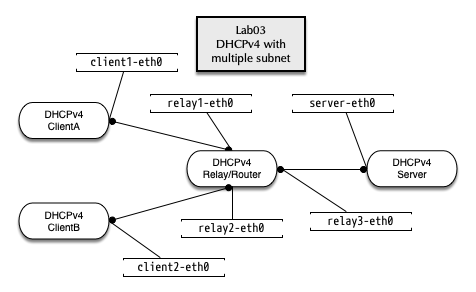
- Change into the directory
/root/lab/lab03on the VM host - Execute the
./runscript
2.1.2 Defining two subnet with pools
- Enter the
kea-servercontainer% enter kea-server
- Add a new subnet for 198.100.51.0/24 to the Kea DHCP4 configuration
[...]
    "subnet4": [
        {
            "subnet": "192.0.2.0/24",
            "pools": [ { "pool": "192.0.2.100 - 192.0.2.200" } ],
            "option-data": [
                {
                    "name": "routers",
                    "data": "192.0.2.1"
                }
            ]
        },
        {
            "subnet": "198.100.51.0/24",
            "pools": [ { "pool": "198.100.51.50 - 198.100.51.90" } ],
            "option-data": [
                {
                    "name": "routers",
                    "data": "198.100.51.1"
                }
            ]
        }
[...]
- Test the configuration file:
[kea-server]% kea-dhcp4 -t /etc/kea/kea-dhcp4.conf
INFO  [kea-dhcp4.dhcpsrv/48] DHCPSRV_CFGMGR_SOCKET_TYPE_SELECT using socket type udp
INFO  [kea-dhcp4.dhcpsrv/48] DHCPSRV_CFGMGR_ADD_IFACE listening on interface server-eth0
INFO  [kea-dhcp4.dhcpsrv/48] DHCPSRV_CFGMGR_NEW_SUBNET4 a new subnet has been added to configuration: 192.0.2.0/24 with params: t1=900, t2=1800, valid-lifetime=3600
INFO  [kea-dhcp4.dhcpsrv/48] DHCPSRV_CFGMGR_NEW_SUBNET4 a new subnet has been added to configuration: 198.100.51.0/24 with params: t1=900, t2=1800, valid-lifetime=3600
- Start the Kea DHCPv4 server and make sure it is running
[kea-server]% systemctl start kea-dhcp4
[kea-server]% systemctl status kea-dhcp4
● kea-dhcp4.service - Kea DHCPv4 Server
   Loaded: loaded (/usr/lib/systemd/system/kea-dhcp4.service; disabled; vendor preset: disabled)
   Active: active (running) since Fri 2018-12-07 06:26:46 UTC; 5s ago
     Docs: man:kea-dhcp4(8)
 Main PID: 54 (kea-dhcp4)
    Tasks: 1 (limit: 1144)
   Memory: 1.9M
   CGroup: /machine.slice/libpod-86d66477595de7e99c051c8f5b9c224d5e566cdbd3edbd5562a8b6fe09bc241a.scope/system.slice/kea-dhcp4.service
           └─54 /usr/sbin/kea-dhcp4 -c /etc/kea/kea-dhcp4.conf

Dec 07 06:26:46 86d66477595d systemd[1]: Started Kea DHCPv4 Server.
Dec 07 06:26:46 86d66477595d kea-dhcp4[54]: 2018-12-07 06:26:46.515 INFO  [kea-dhcp4.dhcp4/54] DHCP4_STARTING Kea DHCPv4 server version 1.3.0 starting
Dec 07 06:26:46 86d66477595d kea-dhcp4[54]: 2018-12-07 06:26:46.518 INFO  [kea-dhcp4.dhcpsrv/54] DHCPSRV_CFGMGR_SOCKET_TYPE_SELECT using socket type udp
Dec 07 06:26:46 86d66477595d kea-dhcp4[54]: 2018-12-07 06:26:46.518 INFO  [kea-dhcp4.dhcpsrv/54] DHCPSRV_CFGMGR_ADD_IFACE listening on interface server-eth0
Dec 07 06:26:46 86d66477595d kea-dhcp4[54]: 2018-12-07 06:26:46.519 INFO  [kea-dhcp4.dhcpsrv/54] DHCPSRV_CFGMGR_NEW_SUBNET4 a new subnet has been added to configuration: 192.0.2.0/24 wit>
Dec 07 06:26:46 86d66477595d kea-dhcp4[54]: 2018-12-07 06:26:46.519 INFO  [kea-dhcp4.dhcpsrv/54] DHCPSRV_CFGMGR_NEW_SUBNET4 a new subnet has been added to configuration: 198.100.51.0/24 >
Dec 07 06:26:46 86d66477595d kea-dhcp4[54]: 2018-12-07 06:26:46.519 INFO  [kea-dhcp4.dhcp4/54] DHCP4_CONFIG_COMPLETE DHCPv4 server has completed configuration: added IPv4 subnets: 2; DDN>
Dec 07 06:26:46 86d66477595d kea-dhcp4[54]: 2018-12-07 06:26:46.520 INFO  [kea-dhcp4.dhcpsrv/54] DHCPSRV_MEMFILE_DB opening memory file lease database: lfc-interval=3600 type=memfile uni>
Dec 07 06:26:46 86d66477595d kea-dhcp4[54]: 2018-12-07 06:26:46.521 INFO  [kea-dhcp4.dhcpsrv/54] DHCPSRV_MEMFILE_LEASE_FILE_LOAD loading leases from file /var/lib/kea/kea-leases4.csv
Dec 07 06:26:46 86d66477595d kea-dhcp4[54]: 2018-12-07 06:26:46.521 INFO  [kea-dhcp4.dhcpsrv/54] DHCPSRV_MEMFILE_LFC_SETUP setting up the Lease File Cleanup interval to 3600 sec
- On a new terminal, enter the relay container and start the ISC DHCP
relay agent
% enter relay
- Start the ISC DHCP relay-agent
[relay]% dhcrelay -id relay1-eth0 -id relay2-eth0 -iu relay3-eth0 -d 100.64.0.1
Requesting: relay1-eth0 as upstream: N downstream: Y
Requesting: relay2-eth0 as upstream: N downstream: Y
Requesting: relay3-eth0 as upstream: Y downstream: N
Dropped all unnecessary capabilities.
Internet Systems Consortium DHCP Relay Agent 4.3.6
Copyright 2004-2017 Internet Systems Consortium.
All rights reserved.
For info, please visit https://www.isc.org/software/dhcp/
Listening on LPF/relay3-eth0/8e:07:03:58:67:e4
Sending on   LPF/relay3-eth0/8e:07:03:58:67:e4
Listening on LPF/relay2-eth0/46:eb:a0:16:f0:8b
Sending on   LPF/relay2-eth0/46:eb:a0:16:f0:8b
Listening on LPF/relay1-eth0/26:fd:31:a7:6f:42
Sending on   LPF/relay1-eth0/26:fd:31:a7:6f:42
Sending on   Socket/fallback
Dropped all capabilities.
- Test the DHCP Client from container
clientAandclientB(each in it's own Terminal or TMUX session)
[host]% enter clientA
[clientA]% dhclient -v client1-eth0
[host]% enter clientB
[clientB]% dhclient -v client2-eth0
2.1.3 Find and fix the issue with clientB
- ClientA will succeed to get an IP-Address, but ClientB will fail. Why?
- Check the logfile on the Kea-Server in
/var/log/kea-dhcp4.log - Compare the IP-Addresses used on the relay with the IP addresses used in the subnet configuration on the Kea server
2.1.4 Solution: there was a number switch typo in the configuration
- Correct subnet configuration (198.51.100.0/24 instead of 198.100.51.0/24):
[...]
    "subnet4": [
        {
            "subnet": "192.0.2.0/24",
            "pools": [ { "pool": "192.0.2.100 - 192.0.2.200" } ],
            "option-data": [
                {
                    "name": "routers",
                    "data": "192.0.2.1"
                }
            ]
        },
        {
            "subnet": "198.51.100.0/24",
            "pools": [ { "pool": "198.51.100.50 - 198.51.100.90" } ],
            "option-data": [
                {
                    "name": "routers",
                    "data": "198.51.100.1"
                }
            ]
        }

[...]
- Re-test the configuration and restart the server, test from
clientB
2.2 Adding global DHCP options
- Now we want to send additional DHCP option to the client machines. We start with the list of DNS resolvers and (next exercise) the local domain name. As the DNS resolver are the same for each subnet, we define the DHCP options on the global server level:
"Dhcp4": {
    "option-data": [
        {
           "name": "domain-name-servers",
           "code": 6,
           "space": "dhcp4",
           "csv-format": true,
           "data": "100.64.53.53"
        }
     ],
[...]
- Test from
clientAandclientB
[clientB]% dhclient -r
Killed old client process
[clientB]% dhclient -v client2-eth0
Internet Systems Consortium DHCP Client 4.3.6
Copyright 2004-2017 Internet Systems Consortium.
All rights reserved.
For info, please visit https://www.isc.org/software/dhcp/

Listening on LPF/client2-eth0/46:11:30:78:2a:9b
Sending on   LPF/client2-eth0/46:11:30:78:2a:9b
Sending on   Socket/fallback
DHCPREQUEST on client2-eth0 to 255.255.255.255 port 67 (xid=0xf2ea4a05)
DHCPACK from 198.51.100.1 (xid=0xf2ea4a05)
bound to 198.51.100.50 -- renewal in 746 seconds.
- Check that the DNS resolver has been written to
/etc/resolv.conf
[clientB]% cat /etc/resolv.conf
; generated by /usr/sbin/dhclient-script
nameserver 100.64.53.53
2.3 Adding a subnet specific DHCP option
- The client container machines are in different DNS domains.
clientAis in the Domaina.example.com, whileclientBis in the Domainb.example.com. - We define a subnet specific DHCP option for each subnet in file
/etc/kea/kea-dhcp4.conf. Add thedomain-nameoption with a different value into each of the two subnet definitions:
[...]
   "subnet4": [
        {
            "subnet": "192.0.2.0/24",
            "pools": [ { "pool": "192.0.2.100 - 192.0.2.200" } ],
            "option-data": [
                {
                    "name": "routers",
                    "data": "192.0.2.1"
                },
                {
                    "name": "domain-name",
                    "data": "a.example.com"
                }
            ]
        },
[...]
- Test the configuration file, restart the Kea DHCP server and check that the server is running without error messages.
- Test the new DHCP option from the DHCP clients, make sure that the
different DNS domains appear in the
searchclause in the file/etc/resolv.conf
[clientB]% dhclient -r
Killed old client process
[clientB]% dhclient -v client2-eth0
Internet Systems Consortium DHCP Client 4.3.6
Copyright 2004-2017 Internet Systems Consortium.
All rights reserved.
For info, please visit https://www.isc.org/software/dhcp/

Listening on LPF/client2-eth0/46:11:30:78:2a:9b
Sending on   LPF/client2-eth0/46:11:30:78:2a:9b
Sending on   Socket/fallback
DHCPREQUEST on client2-eth0 to 255.255.255.255 port 67 (xid=0xcd1e6c31)
DHCPACK from 198.51.100.1 (xid=0xcd1e6c31)
bound to 198.51.100.50 -- renewal in 681 seconds.


[clientB]% cat /etc/resolv.conf
; generated by /usr/sbin/dhclient-script
search b.example.com
nameserver 100.64.53.53
2.4 DHCP reservations
2.4.1 Creating a DHCP reservation
- Kea DHCP supports reservations of client leases based on hardware
interface addresses (MAC-Address), DHCP Unique ID (DUID),
Relay-Circut-ID or Client-ID. Lookup the Hardware-MAC-Address of
your
clientAmachine with the commandip link showand create a reservation based on that hardware address:
[...]
        "subnet4": [
            {
                "subnet": "192.0.2.0/24",
                "pools": [
                    {
                        "pool": "192.0.2.100 - 192.0.2.200"
                    }
                ],
                "option-data": [
                    {
                        "name": "routers",
                        "data": "192.0.2.1"
                    },
                    {
                        "name": "domain-name",
                        "data": "a.example.com"
                    }
                ],
                "reservations": [
                    {
                        "hw-address": "xx:xx:xx:xx:xx:xx",
                        "ip-address": "192.0.2.210",
                        "hostname": "client.a"
                    }
                ]
            },
[...]
- Test the configuration and restart the Kea DHCPv4 server
- Check from
clientAthat the reserved IPv4 address is assigned and the hostname is delivered:
[clientA]% dhclient -r
Killed old client process
[ClientA]% dhclient -v -sf dhclient-debug.sh client1-eth0  | grep host_name
Internet Systems Consortium DHCP Client 4.3.6
Copyright 2004-2017 Internet Systems Consortium.
All rights reserved.
For info, please visit https://www.isc.org/software/dhcp/

Listening on LPF/client1-eth0/6a:52:4e:6c:ee:3d
Sending on   LPF/client1-eth0/6a:52:4e:6c:ee:3d
Sending on   Socket/fallback
DHCPREQUEST on client1-eth0 to 255.255.255.255 port 67 (xid=0xa4d0bd0c)
DHCPACK from 192.0.2.1 (xid=0xa4d0bd0c)
requested_host_name=1
new_host_name=client.a
bound to 192.0.2.210 -- renewal in 833 seconds.
2.5 Custom DHCPv4 options
- Sometimes it is required to define custom DHCP options that are not part of the DHCP standards. These can be vendor specific options, or new DHCP options that are not yet implemented in Kea DHCP.
{
    "Dhcp4": {
        "option-def": [
            {
                "name": "my-message",
                "code": 234,
                "type": "string",
                "array": false,
                "record-types": "",
                "space": "dhcp4",
                "encapsulate": ""
            }
        ],
        "option-data": [
            {
                "name": "my-message",
                "space": "dhcp4",
                "csv-format": true,
                "data": "Hello World"
            }
        ],
[...]
- The ISC DHCP client does not request DHCP option 234, so we need to
tell it to request this option from the client configuration file
/etc/dhcp/dhclient.conf:
option my-message code 234 = text ;
also request my-message;
require my-message;
- Test the new DHCP option
[clientA]% dhclient -r
Killed old client process
[clientA]% dhclient -v -sf dhclient-debug.sh -cf /etc/dhcp/dhclient.conf client1-eth0  | grep message
Internet Systems Consortium DHCP Client 4.3.6
Copyright 2004-2017 Internet Systems Consortium.
All rights reserved.
For info, please visit https://www.isc.org/software/dhcp/

Listening on LPF/client1-eth0/6a:52:4e:6c:ee:3d
Sending on   LPF/client1-eth0/6a:52:4e:6c:ee:3d
Sending on   Socket/fallback
DHCPREQUEST on client1-eth0 to 255.255.255.255 port 67 (xid=0x40dd4037)
DHCPACK from 192.0.2.1 (xid=0x40dd4037)
new_my_message=Hello World
new_dhcp_message_type=5
requested_my_message=1
bound to 192.0.2.108 -- renewal in 85 seconds.
3 Kea Datenbank und Hochverfügbarkeit
3.1 LAB: Kea Database with PostgreSQL
3.1.1 Storing Leases in Postgresql
- Enter the
kea-servercontainer - Initialize and start the PostgreSQL Database
[kea-server]% /usr/bin/postgresql-setup --initdb
[kea-server]% systemctl enable --now postgresql
- Connect to the database server. This PostgreSQL-Server does not have a password set, use the empty password to log in. For a production installation, configure password authentication for the database server. PostgreSQL authentication configuration is out of scope of the ISC Kea DHCP training.
[kea-server]% su - postgres
[kea-server]$ psql postgres
psql (13.4)
Type "help" for help.

postgres=#
- Create a new database,
kea_lease_dbis the name of the database in this example
postgres=# CREATE DATABASE kea_lease_db;
CREATE DATABASE
- Create a user for Kea server to access the database
postgres=# CREATE USER kea WITH PASSWORD 'secure-password';
CREATE ROLE
- Set the permissions for the new user on the database
postgres=# GRANT ALL PRIVILEGES ON DATABASE kea_lease_db TO kea;
GRANT
- Leave PostgreSQL client
postgres=# \q
- Leave the shell with user
postgresto be userrootagain
[kea-server]$ exit
[kea-server]% id
uid=0(root) gid=0(root) groups=0(root)
- Configure the PostgreSQL Database to use
passwordauthentication for the Kea database. The Kea database entries must appear before thealldatabase entries in the file/var/lib/pgsql/data/pg_hba.conf
# TYPE  DATABASE        USER            ADDRESS                 METHOD
local   kea_lease_db    kea                                 password
host    kea_lease_db    kea          127.0.0.1/32           password
host    kea_lease_db    kea          ::1/128                password

# "local" is for Unix domain socket connections only
local   all             all                                     peer
[...]
- Restart the PostgreSQL database server
[kea-server]% systemctl restart postgresql
- Create the database tables using the
kea-admintool
[kea-server]% kea-admin db-init pgsql -u kea -h 127.0.0.1 -p secure-password -n kea_lease_db
- Adjust the
lease-databaseblock in the Kea server configuration to use a PostgreSQL-type database:
[...]
        "lease-database": {
          "type": "postgresql",
          "host": "localhost",
          "name": "kea_lease_db",
          "user": "kea",
          "password": "secure-password"
        },
[...]
- Make sure each subnet definition in the Kea configuration file has an subnet-id number set! Without an ID number being set, Kea will auto-generate numeric IDs which might create collisions in case the subnet configuration will change later
[...]
                    {
                        "subnet": "192.0.2.0/26",
			"id": 1000,
                        "option-data": [
                            {   "name": "routers", "data": "192.0.2.1" }
                        ],
                        "pools": [
                            { "pool": "192.0.2.60 - 192.0.2.63" }
                        ]
                    },
                    {
                        "subnet": "10.0.0.0/24",
                  	"id": 1001,
                        "option-data": [
			   {    "name": "routers",  "data": "10.0.0.1"  }
                        ],
                        "pools": [
                            { "pool": "10.0.0.10 - 10.0.0.20" }
                        ]
                    }
[...]
- Test the configuration file and restart the Kea DHCP server
- Start the DHCP-Relay on the
relaycontainer
[relay]% dhcrelay -id relay1-eth0 -id relay2-eth0 -iu relay3-eth0 -d 100.64.0.1
- Test requesting a lease from
clientAandclientB - Dump the lease database using the
kea-admintool
[kea-server]% kea-admin lease-dump pgsql -u kea -h 127.0.0.1 -p secure-password -n kea_lease_db -o leases.csv -4
Output file, leases.csv, exists and will be overwritten.
Do you wish to continue? (y/n)
y
lease4 successfully dumped to leases.csv
[kea-server]% less leases.csv
address,hwaddr,client_id,valid_lifetime,expire,subnet_id,fqdn_fwd,fqdn_rev,hostname,state
192.0.2.100,fe15e927353b,ffe927353b000400d52b989bf14fbfaeb1f21908f229d9,3600,2018-12-08 21:39:06+00,1,0,0,,default
198.51.100.50,f2b272a61f8d,ff72a61f8d000405a5b16faf254760879df44a6a58636a,3600,2018-12-08 21:38:01+00,2,0,0,,default
3.1.2 Clean Up
- Exit from the
kea-server,relay,clientAandclientBcontainer - Execute the script
./stopand./cleanin/root/lab/lab03